Finding the real video URL
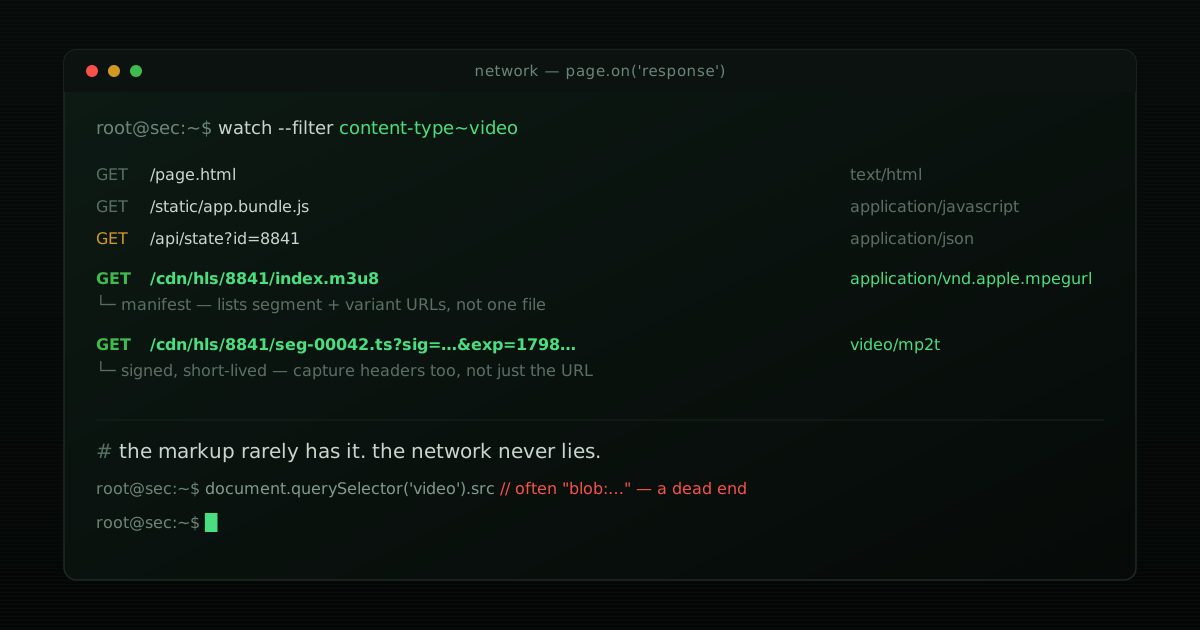
The instinct is to view-source the page and grep for .mp4. On a server-rendered page
from 2010 that would probably work. On most video-hosting pages today it won’t, and the
reason isn’t obfuscation — it’s architecture. This post is the general technique, not
tied to any one platform: how to find the real media URL when the page itself is a
moving target.
cat table_of_contents.txt- Why the HTML doesn’t have it
- Three places the real URL hides
- The general approach: watch the network, not the markup
- Adaptive streaming: when there’s no single video file
- Two gotchas that break naive approaches
- Quick reference
- Scope and authorization
Why the HTML doesn’t have it
A <video src="..."> attribute present at page-load time is the exception now, not the
rule, for three converging reasons:
- Client-side rendering. Modern frameworks (React, Vue, and their meta-frameworks)
ship a near-empty HTML shell and populate the DOM after JavaScript runs.
curl-ing the page or readingview-source:gets you the shell — the<video>element, if it exists at all in the initial response, often has nosrcyet. - Deferred/lazy loading. Even within a fully client-rendered page, video sources are frequently attached only when the player scrolls into view or the user interacts, specifically to avoid loading media nobody watches.
- Media Source Extensions (MSE). Many players don’t set
srcto a remote URL at all. They fetch video segments via JavaScript, feed them into aMediaSourceobject, and point the<video>element at a localblob:URL that represents that in-memory buffer. Thatblob:URL is real, but it’s opaque and local to the page’s JS context — it is not a fetchable network resource, and reading it from outside the page gets you nothing.
None of this is done to thwart scraping specifically — it’s normal architecture for adaptive-bitrate video and JS-rendered UIs. But it means “read the HTML” stops being a reliable method the moment any of the three applies, which is most video-hosting pages built in the last several years.
Three places the real URL hides
Before reaching for a full browser, it’s worth checking the cheaper options first — they don’t always work, but when they do, they’re far less overhead:
- Embedded state JSON. Many server-side-rendered frameworks (Next.js’s
__NEXT_DATA__, similar patterns under other names elsewhere) embed the initial page’s data as a JSON blob inside a<script>tag, so the client-side JS can hydrate without an extra round-trip. That JSON was built server-side and is present in the raw HTML response — no JS execution required to read it — and it frequently contains the actual media URL as a plain string field, even when the<video>tag itself doesn’t. A plain HTTP fetch plus a JSON parse can find this without touching a browser at all. - Structured metadata.
<meta property="og:video">and JSON-LD blocks (<script type="application/ld+json">) are sometimes populated with a direct media URL for social-preview and SEO purposes, independent of what the actual player loads. Worth checking, not worth relying on — it’s frequently a lower-quality or preview variant, not the URL the player itself fetches. - Inline player configuration. Some pages pass a config object directly into a
<script>tag as JavaScript source (not JSON) — avar playerConfig = {...}pattern. A regex can sometimes pull a URL out of this, but it’s the least stable of the three: it’s tied to that specific player’s internal variable naming, which changes without notice.
All three are static-HTML techniques — no browser execution needed — and all three are best-effort. When none of them pan out (increasingly common), the general, reliable method is the one below.
The general approach: watch the network, not the markup
The technique that generalizes across virtually every JS-rendered video page: load the page in a real (headless) browser and observe the actual network traffic, the same way you’d open DevTools’ Network tab, filter by Media, and watch what loads. Whatever mechanism the page uses internally to get the video onto the screen, it has to fetch the bytes over the network at some point — and that fetch is observable regardless of whether the URL ever touches the DOM or a readable JS variable.
With Playwright (Puppeteer’s API is nearly identical):
import { chromium } from 'playwright';

const VIDEO_CONTENT_TYPES = [
  'video/mp4',
  'video/webm',
  'video/mp2t',                        // HLS segments (.ts)
  'application/vnd.apple.mpegurl',     // HLS manifest (.m3u8)
  'application/dash+xml',              // DASH manifest (.mpd)
];

async function findVideoUrls(pageUrl) {
  const browser = await chromium.launch();
  const page = await browser.newPage();
  const found = new Set();

  page.on('response', async (response) => {
    const contentType = response.headers()['content-type'] || '';
    const url = response.url();
    const looksLikeVideo =
      VIDEO_CONTENT_TYPES.some((t) => contentType.includes(t)) ||
      /\.(mp4|m3u8|mpd|webm)(\?|$)/i.test(url);
    if (looksLikeVideo) found.add(url);
  });

  await page.goto(pageUrl, { waitUntil: 'networkidle' });
  await browser.close();
  return [...found];
}
This is more reliable than DOM inspection for one structural reason: it doesn’t care
how the URL got used. Whether the page sets <video src> directly, hands segments to
MediaSource, or fetches through some framework-internal data layer, the bytes still
travel over HTTP and still show up in the response stream. DOM inspection only works
when the mechanism happens to be the simple case.
Two response-filtering refinements worth adding:
- Filter on content-type first, URL extension second — a signed CDN URL frequently has no
.mp4in it at all, just an opaque path and a query string, so extension-matching alone under-catches. - Set a size or duration floor if you’re getting false positives from thumbnail previews or ad-tracking beacons that happen to share a content-type prefix.
As a fallback when network capture comes up empty, query the DOM after the page has settled — this catches the minority of pages that still do it the simple way:
const domUrls = await page.evaluate(() =>
  [...document.querySelectorAll('video, video source')]
    .map((el) => el.currentSrc || el.src)
    .filter(Boolean)
);
Run this after networkidle or an explicit wait for the player to initialize — querying
too early just gets you the pre-hydration empty state.
Adaptive streaming: when there’s no single video file
The single most common way a “find the mp4 URL” approach breaks completely: the page
isn’t serving a flat file at all. It’s serving HLS (.m3u8 playlists, .ts or
fragmented-MP4 segments) or DASH (.mpd manifests) — adaptive-bitrate formats built
so the player can switch quality mid-playback based on network conditions. This is
standard for anything optimized for mobile/variable connections, which covers most
short-form video today.
What the network-capture approach above actually returns in this case is a manifest
URL, not a video file. That manifest is itself just a text file listing the available
quality variants and the segment URLs (or a further sub-manifest per variant) — useful,
but not a video you can hand to a <video> tag as a static file.
To turn that into an actual video file, you generally don’t want to fetch and
concatenate segments by hand. ffmpeg understands HLS and DASH manifests natively and
handles the segment stitching for you:
ffmpeg -i "https://cdn.example.com/hls/8841/index.m3u8" -c copy output.mp4-c copy remuxes without re-encoding, which is fast and lossless when the source
segments are already H.264/AAC (the common case) — drop it only if you specifically need
to transcode.
Two gotchas that break naive approaches
blob: URLs are not fetchable. Covered above, worth repeating because it’s the most
common dead end: if video.src reads as blob:https://example.com/1a2b3c..., that is a
reference to an in-memory MediaSource buffer inside that specific page’s JS context.
There is no way to fetch it externally — it doesn’t exist as a network resource. The fix
isn’t a different way to read that URL; it’s going back to network capture, since the
segments that fed the MediaSource buffer did travel over HTTP and are visible there.
Captured URLs can be signed and short-lived. CDN-delivered media URLs frequently
carry a signature and expiry in the query string (tokens, timestamps, hash parameters),
sometimes paired with a Referer or Origin check on the server side. A URL captured from
the network panel can expire in minutes, or 403 the moment you request it from a
context (a bare curl, a different Referer) that doesn’t match how the browser
requested it. If you need the resource later rather than immediately, capture the
request headers alongside the URL — not just the URL — and replay the fetch with a
matching Referer/Origin/User-Agent, or plan to re-capture at time of use rather than
caching the URL long-term.
Quick reference
| Situation | Where to look |
|---|---|
Page has <video src> populated in raw HTML |
Static parse — no browser needed |
| Framework-rendered page, video absent from raw HTML | Embedded state JSON in a <script> tag |
<video> exists but src is empty or blob: |
Network response capture (headless browser) |
Captured URL ends in .m3u8 or .mpd |
Adaptive streaming — feed the manifest to ffmpeg, don’t treat it as the final file |
| Captured URL works once, then 403s | Signed/expiring URL — capture headers, not just the URL, or re-capture at time of use |
video.src starts with blob: |
Dead end by design — go to network capture instead |
Scope and authorization
None of this is exotic technique — it’s the same observation DevTools’ Network tab gives any site visitor for free, automated instead of manual. That said, what you’re allowed to do with a URL once you’ve found it is a separate question from how to find it, and depends on the platform’s terms of service and the content’s copyright status, which vary by site and by content and aren’t something a general technique can settle for you. Automating access at scale, or redistributing what you download, is where “inspecting how a page works” turns into a decision with actual legal exposure — worth resolving before you build past the “understand the mechanism” stage this post covers.